Give your reMarkable an email address
Email a document from any device and watch it appear on your reMarkable in seconds
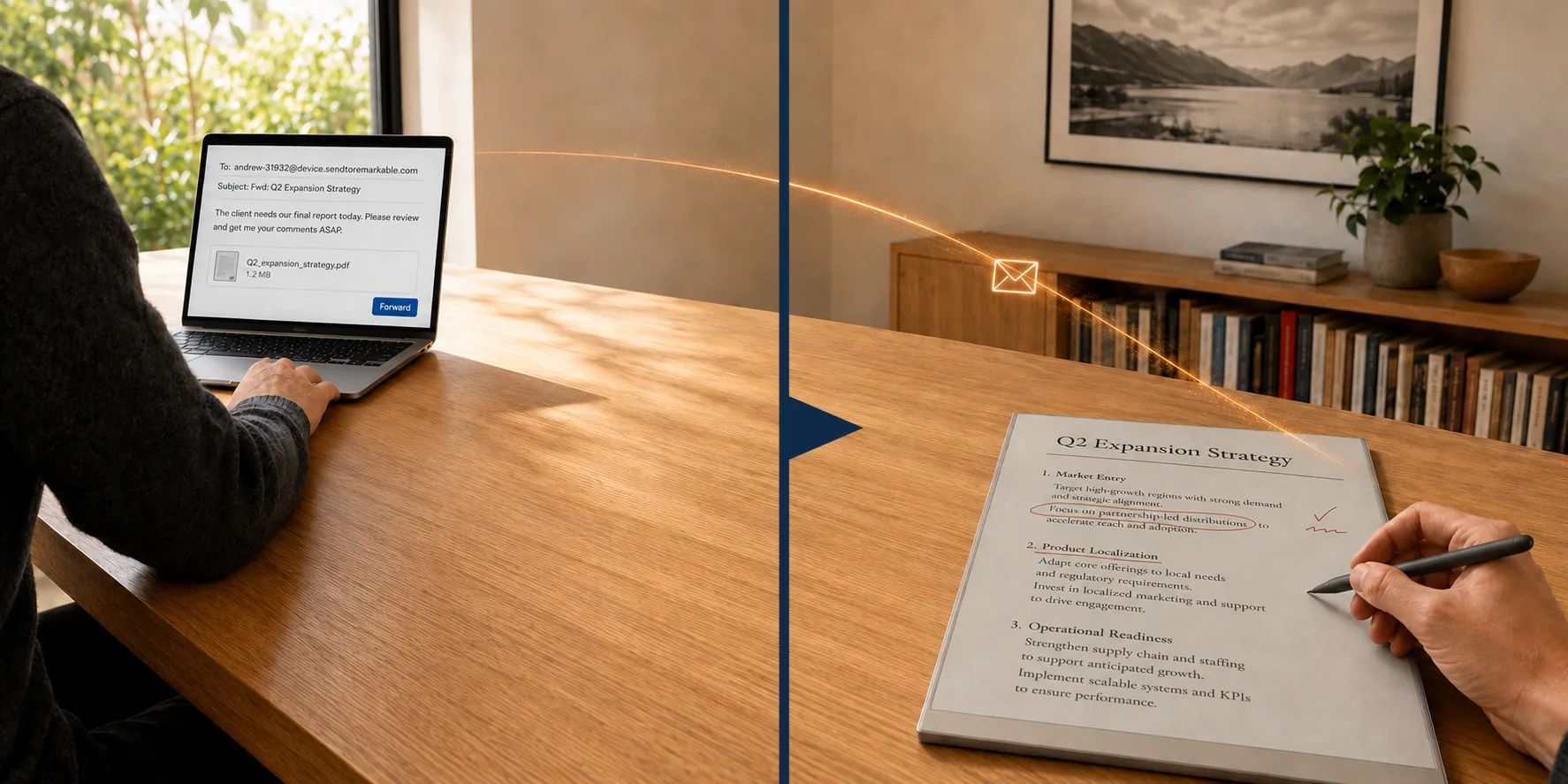
Make syncing your reMarkable a thing of the past. Create a custom address, email your documents, and watch them appear on your reMarkable in seconds.
Built for privacy, documents are encrypted during transport and no copies are retained. No one sees your files but you.
Send to Remarkable also adds capability for Microsoft Word, Excel, and PowerPoint files. Now you can email a draft document and in a matter of seconds the file will arrive on your reMarkable in a native format ready to be viewed and annotated.
Standard syncing
transferring…
- Step 1:Open the app
- Step 2:Copy the file
- Step 3:Upload or transfer by cable
- Step 4:Wait


Send to Remarkable
ready to mark up
Email anything, from anywhere
That's it.
Built on privacy
No one ever sees your documents but you.
Secure in transit
Your documents travel encrypted — from your email provider to our servers, and from our servers to your reMarkable.
Your data is yours
Your documents are wiped from our servers the moment they reach your reMarkable and we never retain copies.
Fully GDPR compliant
Send to Remarkable is built to exceed the most stringent privacy standards, including GDPR.
Built for busy professionals, students, and avid notetakers
The possibilities are endless.
- Documents to sign
- Lecture slides
- Drafts to proofread
- Memoranda and research
- Articles to read later
- Sheet music
Built for real workflows
Pick your destination folder
Customize which reMarkable folder incoming documents land in, so your library stays organized.
Nothing to install
Works purely by email. Nothing to install on your reMarkable, phone, or computer.
Your productivity companion
Forward an emailed document requiring urgent review, a draft report from a colleague, a scan from the office printer - anything, from anywhere, directly to your reMarkable in seconds.
Simple pricing
Sign up today and get a free 15-day trial of our Professional plan with no credit card required and no strings attached. After 15 days, decide whether you want to subscribe. Otherwise, your account automatically reverts to the free tier.
Free
$0
- 10 documents per month
- 3 MB limit per file (Approximately 15-30 pages)
- 1 file per email
- No additional senders allowed
- Standard support
- Delivers PDF and ePub.
Cancel anytime
Premium
$9/year
- 25 documents per month
- 10 MB limit per file (Approximately 50-100 pages)
- Multiple files per email
- Up to 3 authorized senders
- Priority email support
- Delivers PDF, ePub and Word.
Cancel anytime
Professional
$25/year
- Unlimited documents per month
- 35 MB limit per file (Approximately 175-350 pages)
- Multiple files per email
- Up to 10 authorized senders
- Priority email support
- Delivers PDF, ePub, Word, Excel and PowerPoint.
Cancel anytime
1 Microsoft Office files are automatically converted to reMarkable compatible PDFs before delivery to your device.
2 The number of pages per MB varies considerably depending upon the source files. Files containing images or scanned documents have fewer pages per MB than those comprised entirely of text. The 3MB, 10MB, and 35MB caps are hard limits, whereas the page counts are estimates based upon industry averages of files containing both text and images.
3 Your email provider may impose lower limits on outgoing messages in which case those limits will apply. For example, Gmail limits email attachments to a total of 25 MB, Yahoo limits to 25 MB, and AOL limits to 30 MB. Attachment limits on work email varies by employer.